
Separate content scopes
Manage materials and settings by exhibitor and project.
Let visitors scan a QR code to explore products, ask questions and share their needs. Your team manages the content and what can be shared.
Demo and pilot enquiries · content and channels scoped to your use case
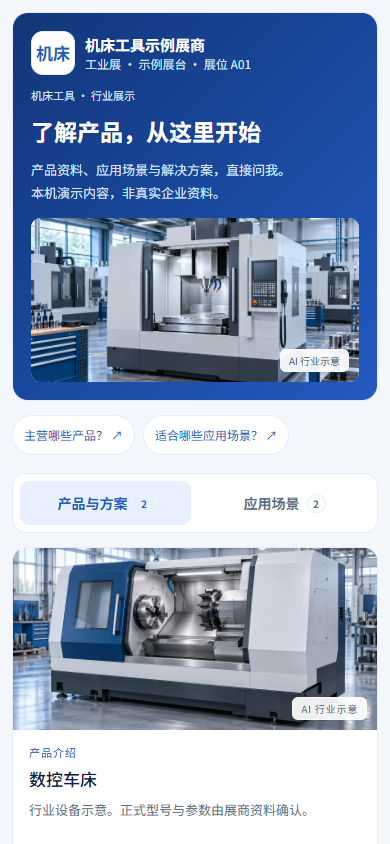
Open the exhibitor reception page and discover the company.
Browse product and application cards.
Ask questions and inspect the sources behind an answer.
Contact the exhibitor or share your requirements for follow-up.
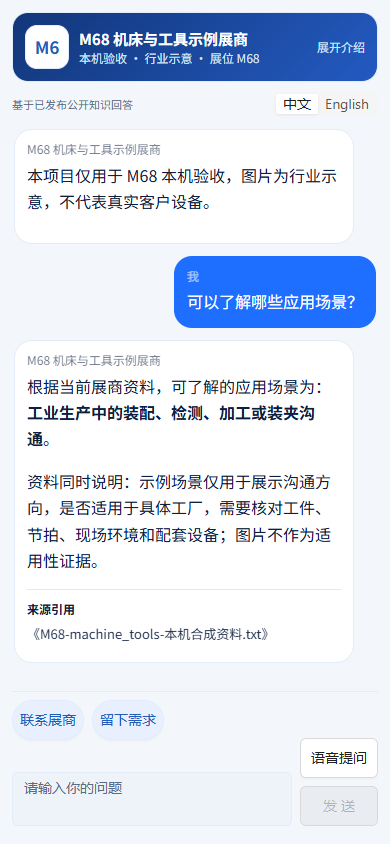
Move from product discovery to questions and supporting materials. Your team follows up on selection, pricing and delivery details that need further confirmation.
Screenshots use synthetic content from local demos and verification, not customer deployments. Industry illustrations do not establish specifications or suitability. Chinese UI shown.
Prepare product documents, FAQs and public contact details.
Set up the introduction, products, imagery and contact options.
Check typical answers, sources and information gaps.
Confirm public scope and channels, then handle visitor enquiries.
Manage materials and settings by exhibitor and project.
Start with labelled industry illustrations, then replace them with company imagery.
Reuse your materials and reception page for subsequent enquiries.
Product documents, FAQs, approved product images and public contact details. A representative document set is enough to start a demo.
Exhibition Assistant uses MoBrain as its knowledge foundation. Define the project materials and public content scope before configuring reception.
Book a demo or discuss a pilot. The entry point depends on your materials, access requirements and content scope; mobile and WeChat use is verified in the intended environment.
Tell us your industry, event dates and available materials. Start with one reception scenario you can evaluate.